A site that looks smart and gets no visitors is a common, expensive mistake. Here is what makes Google show a page, in plain words, and why it is decided long before anybody starts designing.
A Webflow site is ready to rank from launch day when four things are settled before design starts: one page for each question buyers type, a clear heading and a direct answer at the top of every page, fast pages, and Webflow’s own search settings filled in. Rankings still take time to build, since Google says some changes show up in hours and others take months. A site built this way does not have to be rebuilt to earn them.
Key takeaways
- A website only earns visitors if each page answers one question a real person types into Google.
- Decide what every page is for before anybody draws it. Structure is cheap to fix on paper and expensive to fix after launch.
- Slow pages lose twice: they can lose out in Google to equally useful faster pages, and the people who do arrive leave before the page finishes loading.
- Plain writing beats repeating phrases, because what reads your page is trying to judge whether a human would find it useful.
- Bolting all this on a year after launch costs far more than building it in from the first page.
Why a smart-looking site can get no visitors
You paid for a website. It looks good. Six months on, the only people who visit are the ones you sent there yourself. That is a common story, and it is almost never a design problem. It is a problem with what the pages were built to do.
Getting found is not a switch somebody flicks once the site is finished. It is a set of decisions made before the first page is drawn: what pages exist, what each one is for, how fast they load, and how plainly they are written. Those decisions cost nothing while the site is still on paper. They cost a rebuild once it is live.
What Google is actually doing
Strip away the mystery and it is simple. Somebody types a question. Google looks for a page that answers that exact question, on a site it has some reason to trust, that will load before the person gives up waiting.
So there are three jobs. Have a page for the question. Make it obvious that the page answers it. Make it quick. Nearly everything else is detail hanging off those three. The same three jobs decide whether Google’s AI Overviews link to your page. Google says no special file or markup is needed to appear there, only a page it has indexed and can show with a snippet.
Decide what each page is for, before anybody draws it
Start with the questions your buyers actually type. “Garage management software.” “Attendance software for a factory.” “How much does a Webflow website cost.” Those are three different questions and they need three different pages, because a page trying to answer four questions answers none of them properly.
So write the list first. The home page. One page for each thing you sell. One page for each kind of customer you sell to. And somewhere for articles that answer the questions people ask before they are ready to buy.
Then link them sensibly, so somebody reading about your attendance software can reach your factory page in one click. Those links are how you tell Google which of your pages matter most. A site where everything hangs off the home page and nothing links to anything else is telling Google nothing at all.
One page, one question
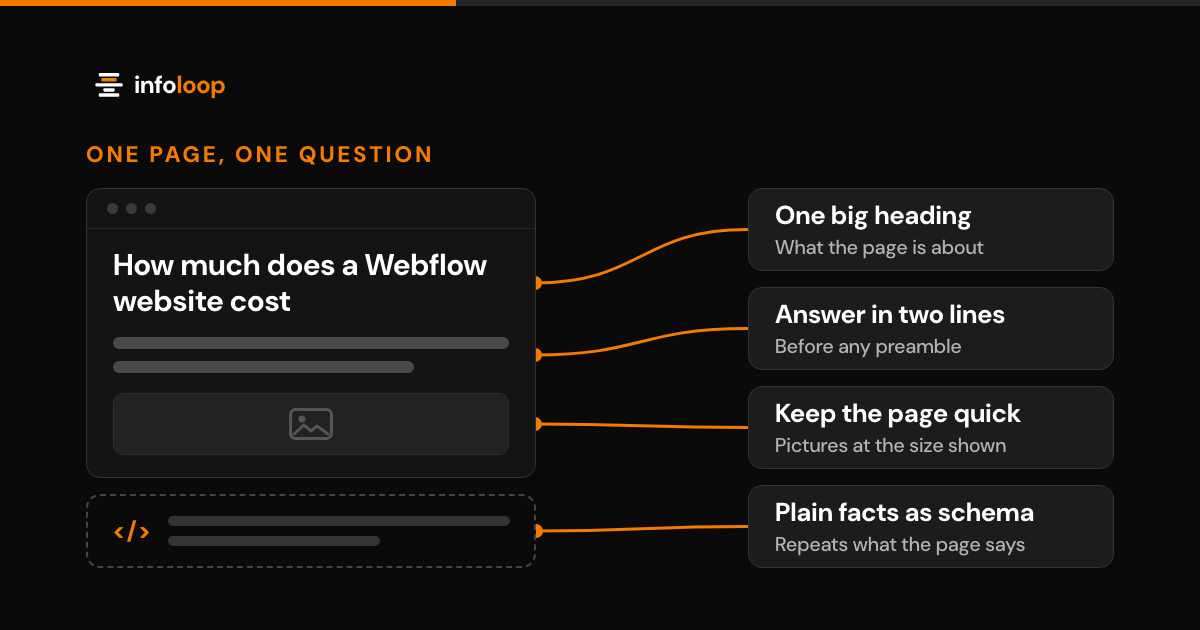
Give every page one big heading at the top that says exactly what the page is about, in the words a customer would use rather than the words your trade uses. Then smaller headings underneath, in the order somebody would actually want to read them.
That is not decoration. It is how a reader skimming on a phone and a search engine reading the page both work out what is in front of them. Most sites get it wrong, usually because the headings were chosen to look right in the design rather than to say anything. It costs nothing to fix and it is one of the few things entirely within your control.
Speed is not a technical detail
A slow page loses twice. Google uses Core Web Vitals, which measure how quickly a page loads, how fast it responds and how stable it stays, when it ranks pages, so a slow page can lose out to an equally useful faster one. The bar is the main content on screen within 2.5 seconds. And the people who do reach a slow page leave before it has finished loading. On a phone, on a weak signal, standing in a parking lot, three seconds feels like a minute.
Speed is mostly restraint. Pictures saved at the size they are shown rather than straight off a camera. No tracking scripts whose reports nobody reads. No video playing behind the headline because it looked good in the mock-up. Webflow will happily let you build a fast site or a slow one; the difference is what you decide to put on the page.
It shows up in money as well as position. When we rebuilt a direct-to-consumer brand’s Shopify store for faster pages and a simpler path to purchase, mobile pages loaded 1.8 seconds faster and conversion rose 38%, meaning more of the people already visiting actually bought something. The same rule holds on Webflow. Quicker, clearer pages earn more from traffic you have already paid for.
Spell out the plain facts underneath
Every page can also carry a short block of code called structured data, or schema markup. Visitors never see the code, but search engines read it directly. It states the plain facts and nothing else: this is a company, this is what it does, this is where it is, this is who wrote this article. In Webflow it goes in the Schema markup field of each page’s settings, and on a CMS template it can pull in each item’s own fields.
It is not a trick and it is not a loophole, so it must only repeat what the page already tells readers. It is the difference between hoping Google works something out and simply telling it. What it no longer does is buy extra room on the results page. Google stopped showing question-and-answer dropdowns in May 2026, and it does not show star ratings that a company marks up about itself. Opening hours and Google reviews live in your Google Business Profile, so keep that complete as well.
Write the way you would explain it on the phone
The old advice was to repeat a phrase until the page reads badly. That stopped working years ago and now does active harm, because what reads your page is trying to judge whether a human being would find it useful.
So answer the question in the first two lines, before any preamble about your company’s history. Use the words your customers use. Be specific, because a price range beats “competitive pricing” and one real example beats “trusted by many”. And put one clear next step at the bottom of every page, since a page that ranks and then leaves people wondering what to do has still failed.
The Webflow settings to fill in before launch
Webflow already has the settings search engines need. They only help if somebody fills them in, page by page, before the site goes live.
| Setting | Where it lives in Webflow | What to do |
|---|---|---|
| SEO title and meta description | Page settings | Write one for every page; on CMS templates, build them from each item’s fields |
| 301 redirects | Site settings, Publishing | Point every old address at its new page before launch |
| Canonical tag | Site settings, SEO | Set your main domain once, so every page names its own address |
| Sitemap | Site settings, SEO, and each page’s settings | Keep the auto-generated sitemap on, and switch off sitemap indexing for pages such as a form’s thank-you page |
| Alt text | Assets panel or image settings | Describe what each picture shows, in plain words |
| Image size | Assets panel | Convert large JPG and PNG files to WebP; Webflow then makes the smaller copies phones need |
| Schema markup | Page settings | Add the company and article facts, and bind CMS fields on templates |
Each of these takes minutes while the site is being built and far longer to retrofit across a live one.
What it costs to leave it until later
The bill for skipping all this arrives eventually and it is bigger. Pages get rewritten. The site gets restructured. Addresses people have already shared stop working unless somebody carefully points the old ones at the new. And every quiet month in between is a month you are paying somewhere else for visitors you should have been getting for nothing.
Building it in at the start adds almost nothing to the price, because most of it is a matter of what you decide rather than what you buy.
In short
Decide what each page is for. Say it plainly at the top. Keep the page quick. State the facts underneath in a form search engines can read. Write for the person, not the machine. Do that from the first page and you launch with search already working instead of paying to bolt it on a year later. Infoloop builds every site this way, and supports it after launch rather than handing over a folder and going quiet.
Planning a new Webflow site, or wondering why the current one gets no visitors? Infoloop is a certified Webflow Partner, and Webflow websites start from $4k, with a fixed price agreed in writing once the scope is clear. Book a website review, and in a 30-minute call we will go through your pages, speed and search settings with you. If you would rather add a developer to your own team, you can hire a Webflow developer instead.
Frequently asked questions
Why does a website that looks good get no visitors?
It is almost never a design problem: it is a problem with what the pages were built to do. Getting found depends on decisions made before the first page is drawn. They cover what pages exist, what each one is for, how fast they load and how plainly they are written.
How does page speed affect Google rankings and sales?
A slow page loses twice: Google uses page experience signals when it ranks pages, so it can lose out to an equally useful faster page, and visitors leave before it finishes loading. Quicker, clearer pages earn more from traffic you have already paid for. Speed is mostly restraint: pictures saved at the size they are shown, no tracking scripts nobody reads, and no video playing behind the headline.
What does it cost to add SEO after a Webflow site is launched?
Leaving it until later costs far more, since building it in at the start adds almost nothing to the price. Pages get rewritten and the site gets restructured. Old web addresses stop working unless somebody points them at the new ones. Every quiet month means paying elsewhere for visitors you should get for nothing.
Is Webflow good for SEO?
Yes. Webflow has the settings search needs built in: a title and description for every page, patterns for CMS pages, 301 redirects, a sitemap that updates on publish, canonical tags and a schema markup field. The platform rarely holds a site back. Thin pages, heavy images and an unplanned structure do.

Co-founder and Managing Partner
Riya leads Infoloop's Webflow, Shopify and custom website work, delivering sites and online stores for brands worldwide.