A scalable ecommerce platform lets traffic, orders and catalog size grow without a rewrite. Each part of the store scales on its own. Reads come from a cache and slow work waits in a queue, so a rush of browsing never slows checkout.
Most online stores do not break on a quiet Tuesday. They break during the big sale they spent months planning. This guide covers the main architecture patterns, a peak-traffic checklist and what each stage of growth tends to cost.
Key takeaways
- A scalable store lets each part grow on its own, so a rush of shoppers browsing never slows checkout.
- Start with a hosted platform or a well-structured single app. Split out services only where load or team size calls for it.
- Before every big sale, load test at several times your expected peak and move slow jobs off the checkout path.
It is written for founders, e-commerce managers and technology leaders whose store is starting to feel the strain of growth.
What makes an e-commerce platform scalable?
An e-commerce platform is scalable when each part can take more load without slowing the others down. Browsing, search, cart, checkout, inventory and payments all see very different traffic, so they should never share a single bottleneck.
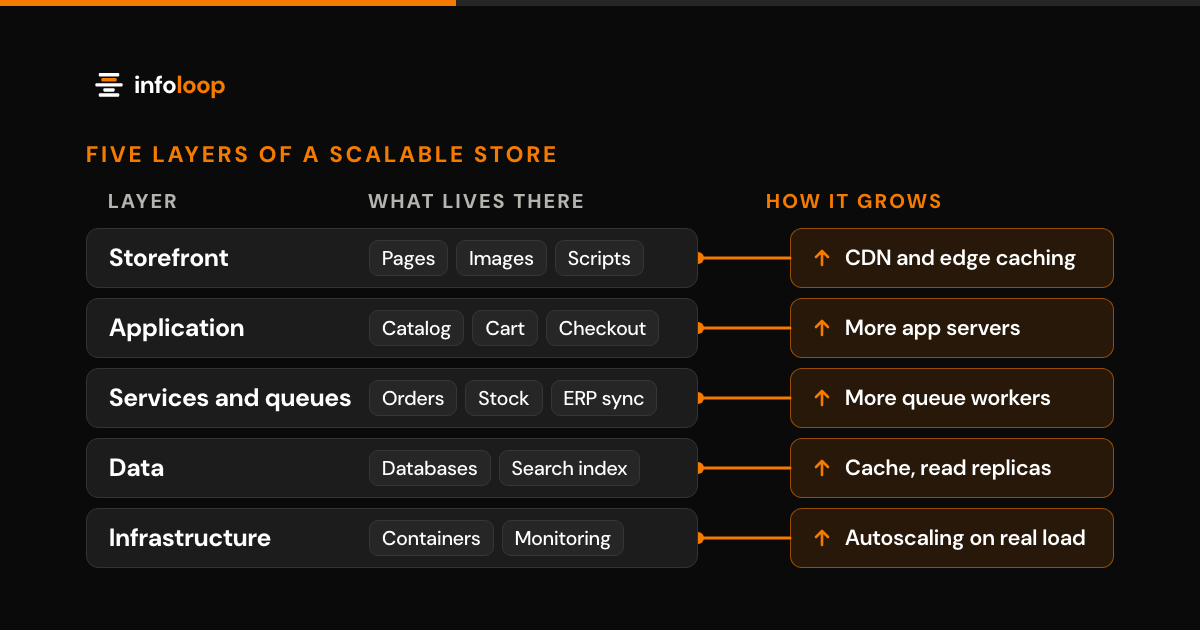
Ecommerce platform architecture is how a store’s storefront, application, services, data and hosting layers are split and connected. Picture it as five layers, each of which grows in its own way.
| Layer | What lives there | How it grows |
|---|---|---|
| Storefront | Pages, images, scripts | CDN and edge caching |
| Application | Catalog, cart, checkout, accounts | More app servers behind a load balancer |
| Services and queues | Orders, stock, email, ERP sync | More workers reading from a queue |
| Data | Product and order databases, search index | Cache, read replicas, a search engine |
| Infrastructure | Containers, hosting, monitoring | Autoscaling on real load |
Here is a quick test: if a spike in product views can slow down checkout, the layers are connected too tightly. Good ecommerce architecture keeps them loosely coupled, so one busy layer does not drag the rest of the system down with it.
Scalability vs performance: what is the difference?
Performance is how fast a single visit feels, while scalability is whether it stays that fast when visits grow tenfold.
Google’s Core Web Vitals (web.dev, checked September 2026) set a clear bar. Largest Contentful Paint should take 2.5 seconds or less. Interaction to Next Paint should take 200 milliseconds or less, and Cumulative Layout Shift should stay at 0.1 or less, all measured at the 75th percentile of visits. A store can pass comfortably with 200 shoppers and still fail with 20,000 during a promotion.
There are two ways to add capacity, and they behave very differently under pressure. Vertical scaling moves the app to a bigger server, which is simple, but every server eventually hits a ceiling. Horizontal scaling adds more servers that share the load. It has no fixed ceiling, which is why a scalable ecommerce architecture depends on it. The catch is that the app must work the same way on every server, so sessions and carts belong in shared storage.
Monolith, microservices, headless or composable: which fits?
Most growing stores should start with a hosted platform or a well-structured monolith. Split out services only where traffic or team size really calls for it. Headless and composable setups pay off when you need a custom front end, a mobile app or many sales channels.
| Pattern | What it means | Fits when | Watch for |
|---|---|---|---|
| Hosted platform | The vendor runs hosting, checkout and scaling | Your catalog and flows fit the platform | App sprawl and platform limits |
| Modular monolith | One app with clear internal modules | One or two teams with custom logic | One shared database becomes the limit |
| Microservices | Separate services for catalog, cart, orders and stock | Several teams and uneven load | More moving parts and harder debugging |
| Headless | A custom front end on commerce APIs | Custom design, apps or many channels | Two systems to maintain |
| Composable (MACH: microservices, API-first, cloud-native SaaS, headless) | Chosen parts from many vendors, joined by APIs | Enterprise scale and a strong in-house team | Integration work and many licenses |
Headless and microservices answer different questions, even though people often discuss them together. Headless separates the storefront from the commerce engine, while microservices split the back end into separate services. You can run a headless store on a single back-end application, and many stores do. Shopify’s Storefront API is one example: a custom front end calls it for products and carts, then sends the shopper to Shopify’s own checkout through the cart’s checkout link.
Our advice on ecommerce architecture patterns is to choose the simplest option that will handle your next two years of growth. A well-organized application can be split up later, but untangling a rushed one is slow and costly.
How should the data layer and caching work?
Most store traffic is reading, not writing, so serve reads from a cache and keep writes on one primary database. After that, add a separate search engine for product search and read replicas for reports.
Work through the layers in this order:
- CDN. Serve images, scripts and the category pages that guests see from edge servers close to each shopper.
- In-memory cache. Keep popular products, prices and sessions in a fast store such as Redis, with short expiry times for stock and price.
- Search index. Run search and filters on an engine such as Elasticsearch, OpenSearch or Algolia, never on the primary database.
- Read replicas. Send account pages, order history and reports to copies of the database, leaving the primary free for checkout and other writes.
- Sharding. Divide data across several databases only when a single primary cannot keep up with writes, because sharding adds a lot of complexity.
One rule makes caching reliable: when a product changes, clear its cached copy at once, and treat expiry times as a safety net.
How should queues handle the order pipeline?
Checkout should handle only what the shopper must wait for: confirming stock, taking payment and saving the order. Everything else belongs on a queue, where background workers process it a few seconds later.
Work that can wait includes confirmation emails, invoices, ERP and warehouse sync, loyalty points and analytics events. If the email service slows down on sale day, orders still go through and the messages catch up later.
The one step that must be exact is the inventory reservation. Reserve the item with a single database update that fails when no stock remains, so two buyers cannot claim the last unit. If payment fails or the shopper leaves, release the hold after a short timeout so the unit goes back on sale.
Tools such as RabbitMQ, Amazon SQS and Kafka carry the queue, and the choice matters less than two rules. First, keep slow side jobs off the checkout path entirely. Second, make every job safe to run twice, because queues retry failed messages.
How does autoscaling work for an online store?
Autoscaling adds servers when load rises and removes them when it falls, so you pay for peak capacity only during the peak.
In Kubernetes, the Horizontal Pod Autoscaler does this job. It adds copies of an application when CPU, memory or a custom metric crosses a target. By default it checks every 15 seconds (Kubernetes documentation, checked September 2026). Hosted platforms such as Shopify manage this capacity for you, which is one reason they suit many growing stores.
Autoscaling has real limits, though, because new servers need time to start and warm up. Scale up before a known sale instead of waiting for the spike to arrive. Autoscaling also helps only the parts that can run as many copies. A single primary database does not scale this way, which is why the data layer needs its own plan.
What should a peak-traffic checklist include?
A peak-traffic checklist should cover load testing, capacity, caching, outside services, monitoring and a rollback plan. Run it a few weeks before any major sale, product launch or marketing campaign.
- Load test at several times last year’s peak traffic, including checkout and payment, not just the home page.
- Set measurable targets for orders per minute, page views per second and checkout speed.
- Warm the cache and the CDN before the sale starts, so the first visitors do not hit a cold system.
- Scale up capacity ahead of the start time rather than relying on autoscaling to react.
- Pause heavy background jobs such as product imports, search reindexing and bulk exports.
- Freeze code and theme changes a few days before the sale, except for urgent fixes.
- Confirm rate limits with your payment, tax, shipping and ERP providers.
- Prepare a virtual waiting room page for extreme traffic spikes.
- Monitor errors, checkout time and stock sync live, and name the person who responds to each alert.
- Write a rollback plan and rehearse it at least once.
What does a scalable ecommerce platform cost?
Cost depends on your growth stage more than on the architecture pattern you choose. Budget for the initial build, then for hosting, apps, licenses and a monthly support plan, because running costs add up fast.
| Stage | Typical setup | Main costs |
|---|---|---|
| Launch and early growth | Hosted platform, theme, a few apps | Platform plan, app fees, theme work |
| Scaling | Custom theme or headless front end, ERP and search links | Build, integrations, apps, monitoring |
| High volume or many markets | Headless or composable, custom services, queues | Engineering team, cloud hosting, licenses, support |
Compare options over three years rather than on the launch price alone. Add up hosting, licenses, app fees, payment fees, support and the team that maintains the platform. A cheaper build with high monthly fees can easily cost more by the third year.
At Infoloop, websites and stores start from $4k, and custom software, such as order or inventory services, starts from $15k. Clear scope gets a fixed price, evolving scope is billed hourly, and every project begins with a written estimate.
How do you move off a monolith?
Move one part at a time while the old system keeps selling. Martin Fowler calls this the strangler fig approach, where new code grows beside the legacy system and takes over its jobs one by one.
- Map every integration and URL first, including the ERP, payments, tax, shipping, apps and the pages Google ranks.
- Choose one slice with a clear boundary and a real payoff, such as search or product pages.
- Place a routing layer in front, so you can send some traffic to the new part and switch back quickly.
- Run old and new versions side by side, compare the results, then gradually move more traffic.
- Redirect every changed URL with a 301, so existing search rankings carry over to the new pages. Our guide to SEO from day one covers the other search basics to keep through a move.
- Retire the old part only after the new one has handled a truly busy sales period.
A big-bang rewrite pauses new features for months and puts every sale at risk on launch day. For a broader plan, read our guide to legacy modernization, step by step.
How Infoloop helps
Infoloop is a certified Shopify and Webflow Partner. We build Shopify stores, provide dedicated Shopify developers and write custom commerce software, from store migrations to order, inventory and accounting integrations, for e-commerce and retail companies and D2C brands. For one direct-to-consumer brand, a Shopify rebuild lifted conversion by 38% (Infoloop case study, 2026). As of 2026, software from Infoloop’s 50+ projects is live in 6 countries, and the company is rated 4.8 on average across Trustpilot, Google, Clutch and GoodFirms.
Is your store starting to strain? Book a store review. The 30-minute call covers your goals, users and constraints, and within about a week you get a written proposal with the scope, timeline and estimate. You can also start with our e-commerce development services. Infoloop works with clients worldwide from offices in Surat, India, and Dover, Delaware.
Frequently asked questions
What makes an e-commerce platform scalable?
A platform is scalable when each part can take more load without slowing the others. Browsing, search, checkout and inventory see very different traffic. A scalable setup caches what shoppers read, queues work that can wait, and adds servers automatically, so sales can grow without a rewrite.
Should a growing store use microservices or a monolith?
Most growing stores should start with a hosted platform or a well-structured monolith. Microservices pay off when several teams ship changes to different parts of the store, or when one part, such as search, needs far more capacity than the rest. Before that point, they add cost and moving parts.
What is the difference between headless and microservices?
Headless separates the storefront from the commerce engine, while microservices split the back end into separate services. They solve different problems. A store can run a custom headless front end on a single back-end app, and many do. Choose headless for design freedom and channels, microservices for team and load needs.
What does a scalable e-commerce platform cost?
Cost depends mostly on your growth stage, not on the pattern you pick. Early stores pay for a platform plan, apps and theme work. Larger stores add integrations, search, hosting and support. At Infoloop, websites and stores start from $4k, and custom software starts from $15k, with a written estimate first.
How do you move off a monolith without losing sales?
Replace one part at a time while the old system keeps taking orders. Pick a slice with a clear edge, such as search, route some traffic to the new version, compare results, then move the rest. Redirect every changed URL with a 301 so search rankings carry over.
What is the difference between scalability and performance?
Performance is how fast one visit feels, and scalability is whether it stays fast as visits grow. A store can load quickly for 200 shoppers and still slow down for 20,000. Scaling usually means adding servers that share the load, so carts and sessions must live in shared storage.
Does autoscaling handle sale-day traffic on its own?
Only in part, because new servers need time to start and warm up. Scale up before a known sale instead of waiting for the spike. Autoscaling also helps only the parts that run as many copies, so a single primary database still needs caching and read replicas.
How do you prepare an online store for a big sale?
Load test at several times last year's peak, including checkout and payment. Then warm the cache and CDN, scale up before the start time and pause heavy background jobs. Freeze code changes a few days ahead, confirm partner rate limits and name who responds to each alert.

Co-founder and Managing Partner
Riya leads Infoloop's Webflow, Shopify and custom website work, delivering sites and online stores for brands worldwide.